Use iTunes to Backup Music 2018 Guide
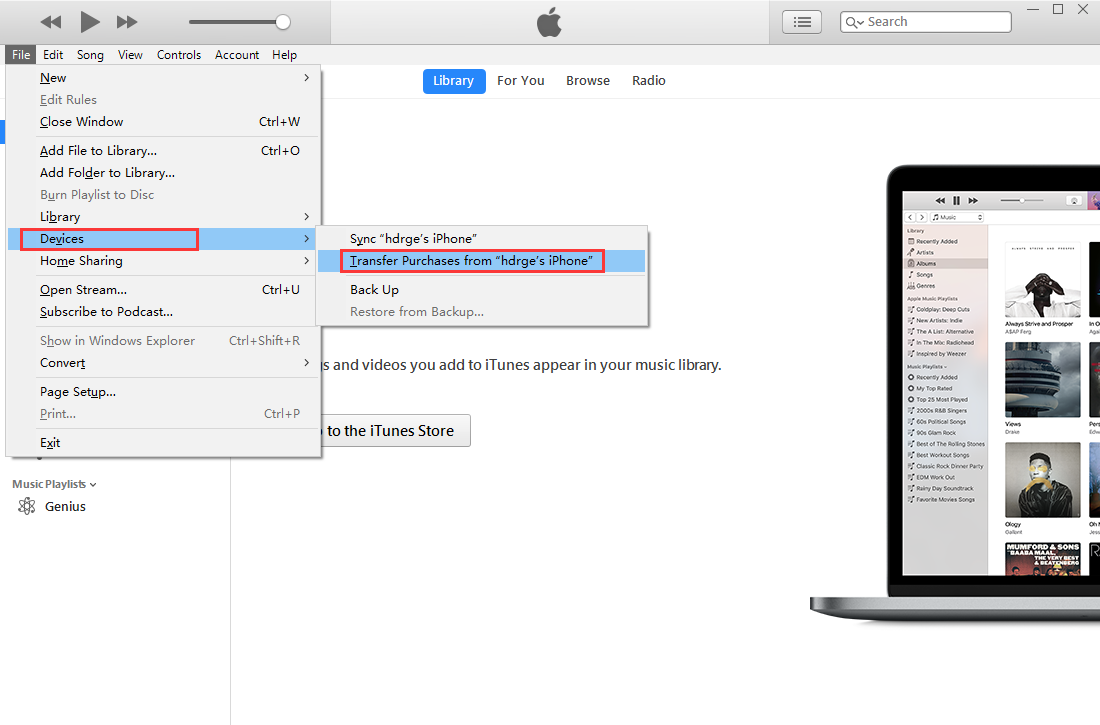
Use iTunes to Backup Music If you change your iPhone or have unfortunately lost or damaged it, iTunes backup can help restore your lost data like music, camera roll, settings, accounts and documents on your new device. This means even if you have had the worst day and lost your precious iPhone, you can still take comfort in the thought that iTunes got your back and your backup! Steps to Backup Music from iPhone to iTunes On your PC or Mac, open iTunes. Using a USB cable, connect your iPhone. Follow the on-screen steps, like use a passcode and “trust this computer”. Click “ File ”. It's in the upper-left side of the iTunes window (Windows) or the top menu bar of the screen (Mac). Select “ Devices ”. This option is near the bottom of the File drop-down menu. Click “ Transfer Purchases from [Name] ”. Instead of "[Name]", you'll see your iPhone's name here. Clicking this option prompts the music to begin transferring onto your computer. Wait f...